
Build Flash Utility
BuildFlash.exe is a standalone utility that has no dependencies on any underlying software. This tool is used for creating a binary file to be used for Sound Design modules which are FFS/Flash based. This tool enables the creation of an FFS container that can include multiple files. Once generated, the complete container can be flashed onto the target Flash device in a single operation, significantly improving efficiency.
The BuildFlash.exe can be accessed in the Audio Weaver Folder C:\DSP Concepts\AWE Designer 8.D.3.2\Bin\win32-vc142-rel\BuildFlash.exe
BuildFlash.exe Command-Line Arguments
The following options are available when using BuildFlash.exe:
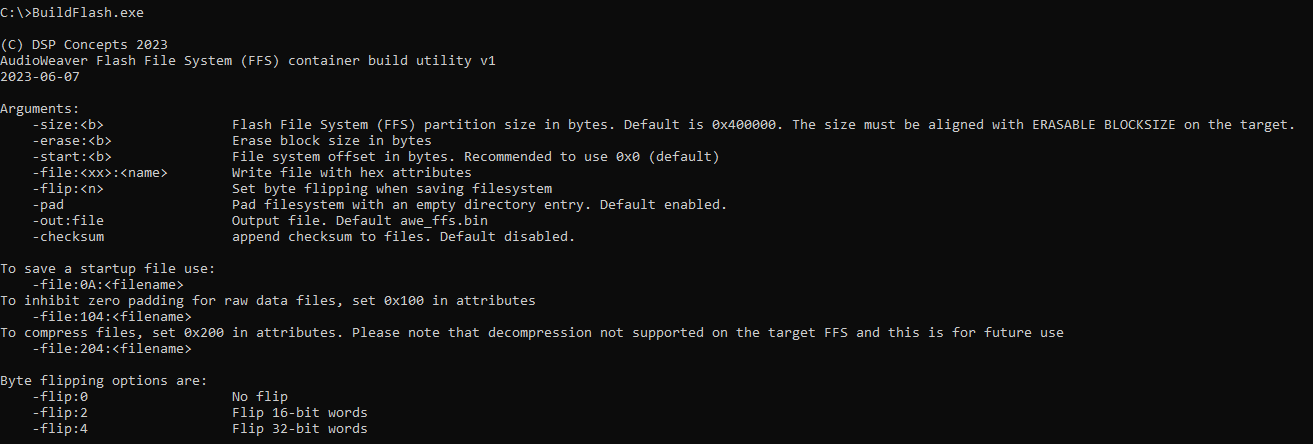
-size: Is the size of the flash file system container in bytes. The size must be aligned with ERASABLE BLOCKSIZE on the target where the FFS container going to be deployed.
-erase: Is the erasable block size. Default is 0x10000. This is just internal purpose only and has no impact on the target.
-start: Is the start offset where FFS begins. Default is 0x0 and recommended to set at 0x0 for portability across different target options of start offset. i.e. on the target flash device, the container file (.bin) can be programmed at any offset.
-file:<Attr>: Is the combination of attribute byte followed by the file name, in hex format. Attr is a 10 bit word with lower 8 bits has the following options:
0x02 - Startup File
0x04 - Raw Data File (any files like .wav etc)
0x08 - Compiled Script (typically *.awb)
And the upper 2 bits has the following options:
0x100 - To avoid inhibit zero padding at the end of raw data files, set this bit field.
0x200 - To compress the files before adding into the flash file system container.
-flip: Is used to flip the data bytes before writing into FFS container. AWE FFS supports 32-bit data in little endian format and if the file to be written has different endianness please use this option accordingly.
-pad: To append one empty file system directory at the end. Default is 1, with padding enabled.
-out: Is the output file name. Default is 'awe_ffs.bin'.
-checksum: To append each added file with a checksum at the end.
Example Script for Creating Bin File
Using the above mentioned attributes for the BuildFlash.exe options, we have a simple script that creates a Binary file containing all the example wave files.
appointed.wav
bell.wav
notification_light.wav
seatbelt_warning.wav
turn_signal.wav
C@ECHO OFF .\BuildFlash.exe ^ -size:0x3ff000 ^ -start:0x0 ^ -file:104:"appointed.wav" ^ -file:104:"bell.wav" ^ -file:104:"seatbelt_warning.wav" ^ -file:104:"turn_signal.wav" ^ -flip:0 ^ -pad ^ -out:../Flash_Player.bin PAUSE
The generated Flash_Player.bin file is flashed through the AWE Flash Manager or can be used an input for the Argument ‘FFSFileName’ in FFS Wave Players
