
Subcanvas Overview
Overview
The Subcanvas module allows an entire layout to be embedded into a single module for use within another layout.
Discussion
For general usage, see the Subcanvas User Guide in the Designer docs.
Subcanvas Module Arguments
awcFile – name of the AWC file which holds the subcanvas. You can specify a full path name here or you can just enter the base file name and Audio Weaver will use the File Search Path to locate the AWC file. We strongly recommend that you only enter the base file name since it makes it easier to share your design with others.
Note that the AWC file pointed to must be of the containerType ‘Subcanvas’ (containerType is the first item listed in the AWC JSON file). If the AWC has containerType ‘Toplevel’ then the Subcanvas module prebuild will fail. ‘Toplevel’ container types differ from ‘Subcanvas’ containers in that they either target multiple instances in the AWB, or they contain Snapdragon specific audio I/O modules.
targetName – string of up to 8 characters which will be used for the target name of the internal AWEInstance. This is useful when attaching to the Subcanvas for debugging.
fundamentalBlockSize – this configures the fundamental block size of the AWEInstance inside of the Subcanvas. If you set this to “awc” then it will set this to the block size of the input pin of the IP inside the AWC file.
fastAHeap, fastBHeap, slowHeap – strings which specify how the heaps in the Subcanvas are mapped to heaps in the PSF. These strings must match the macros used by the function awe_fwMalloc() to allocate memory. Possible values are:
AWE_HEAP_FAST – Only use the FAST A heap. If the FAST A heap is full, then allocation will fail.
AWE_HEAP_FASTB – Only use the FAST B heap. If the FAST B heap is full, then allocation will fail.
AWE_HEAP_SLOW – Only use the SLOW heap. If the SLOW heap is full, then allocation will fail.
AWE_HEAP_FAST2SLOW – Use the FAST A heap. If this is full, try the FAST B heap. If this is full, then try the SLOW heap. This is the safest solution.
AWE_HEAP_FASTB2SLOW – Use the FAST B heap. If this is full, then try the SLOW heap.
numInPins – number of input pins on the Subcanvas. This was added for further expansion. For now, this must be set to 1.
outputIO – string which specifies the properties of the output pin of the Subcanvas. If set to ‘awc’, then module will use the pin information found in the AWC file. If you want to manually specify this, use comma separated values as shown below:
numChannels, blockSize, sampleRate, datatype, isComplex
For example,
‘1,240,48000,fract32,0’
specifies numChannels=1, blockSize = 240, sampleRate = 48000, fract32 data, and non-complex.
Allowable values for dataType are ‘float’, ‘fract32’, ‘int32’, ‘uint32’.
Note: In the current implementation, you should only use ‘fract32’ data since this matches the Audio Weaver hardware output pin.
heapSizes – string specifying the heap sizes in the internal AWEInstance. If you use ‘awc’, then it will use the heap sizes in the AWC file. Otherwise, use a comma separated list: ‘1000,2000,3000,0’. This will set FAST A heap to 1000 words, FAST B to heap 2000 words, SLOW heap to 3000 words, and the SHARED heap to 0 words. A Subcanvas is not allowed to span across multiple instances and the size of the shared heap is always 0. There is no need to pad the shared heap.
workerThreads – Configures internal worker threads which pump the Subcanvas. See the Subcanvas User Guide for more detail.
Note: If the Subcanvas layout has multiple threads with the same clock divider, like 1A, 1B, 1C, 1D etc, first thread (1A) always runs in Subcanvas module thread and remaining threads runs in separate worker thread. If the Subcanvas module lives in thread 1B of parent layout, then both main thread (1A) and worker thread with 1B runs in the same level of thread 1B. In this case, user can override worker thread ID's to unique threads via workerThreads argument. For example, the user can override it with "1A0,1C0,1D0" or "1E0,1F0,1G0" etc.
Subcanvas Module Inspector
Double-clicking on the Subcanvas module will open its inspector. There are many useful things here for controlling and debugging the system.
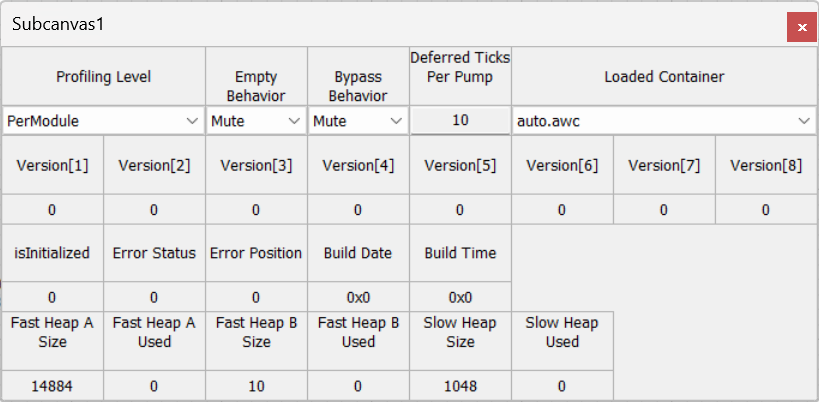
Profiling Level
Allows you to control what profiling information is gathered internally in the Subcanvas. This is only useful if you have the original AWD that was used to create Subcanvas and you are attaching to it. Possible settings are:
None – Profiling is disabled.
PerLayout – Only profiling information at the overall layout level is gathered.
PerModule – Detailed per module profiling information is gathered.
Turning internal profiling off may save a small amount of processing power on some systems.
Empty Behavior
How should the Subcanvas module behave when there is no AWB internally loaded? There are two options:
Mute – the output is muted.
Copy – the input channels are copied to the output channels. This is done with channel matching.
This is only applicable when late loading the Subcanvas or destroying the internal contents.
Bypass Behavior
How should the Subcanvas module act when bypassed? There are 2 options:
Mute – the output is muted.
Copy – the input channels are copied to the output channels. This is done with channel matching.
Deferred Ticks Per Pump
This is a deep internal setting for the AWEInstance. The Deferred Ticks are used by ParamSet modules that are not running in the real-time thread. This setting determines how many times the AWECore function awe_fwTick() is called after each pump. The default setting of 10 should be adequate for most applications. If your Subcanvas contains many modules that require deferred processing, you could increase this to 20 to 30.
Loaded Container
This is a drop list which allows you to late load the AWB data or to destroy the running system. The drop list will contain 2 elements, and an example is shown below:
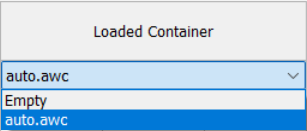
If you select “Empty” the internal system in the Subcanvas module will be destroyed and the Subcanvas will be empty. The second line is always the name of the AWC file. Selecting this will cause the AWB to be loaded.
Note that this drop list works in Designer and the AWB file contents are downloaded from the PC to the target via the tuning interface. You cannot control this drop list at run-time using a ParamSet module.
Version
These are 8 int32 values which correspond to the version information that was provided when generating the Subcanvas. This will show the version information from the AWC file by default, but if the internal Subcanvas layout contains a ver_info module, then the version information will be read from that module instead. Destroying the Subcanvas layout (e.g. by setting Loaded Container to Empty) will not clear the version information.
Build Date and Build Time
Two uint32 values which are shown in hexadecimal format. You can read off the time at which the AWB used by the JSON file was built. Date is in YYMMDDxx format and Time is in HHMMSSxx format. From the figure above:
0x25041100 = April 11, 2025
0x15411100 = 15:41:11 (3:41 PM and 11 seconds)
isInitialized
This is set to 1 when the loading of the internal AWB succeeded. This flag is set by the function load_subcanvas.m. If the loading is not complete, or if an error occurred, then isInitialized will be equal to 0.
If you have logic in your overall signal flow that needs to know whether the isInitialized flag is set, you can use the ParamGet module and read the internal variable ‘NAME.SC.isInitialized’ where NAME is the name of your Subcanvas.
Error Status and Error Position
Used to debug AWB loading issues. Error Status = 0 indicates no errors. Negative values indicate errors and details on how to interpret the error codes can be found in the AWE Core documentation.
If an error occurs, Error Position reflects the offset in the AWB file that had the failing command. You can parse the AWB file (awb_parse.m) and use the offset to identify which specific command failed.
Heap Information
For each of the 3 heaps, the inspector shows the total allocated size and how much of the heap has been used.
Type Definition
typedef struct _ModuleSubcanvas
{
    ModuleInstanceDescriptor instance;            // Common Audio Weaver module instance structure
} ModuleSubcanvasClass;
Variables
Properties
Name | Type | Usage | isHidden | Default value | Range | Units |
numWorkerThreads | int | const | 0 | 0 | Unrestricted | |
fastHeapASize | uint | const | 0 | 352 | Unrestricted | |
fastHeapBSize | uint | const | 0 | 11 | Unrestricted | |
slowHeapSize | uint | const | 0 | 53 | Unrestricted | |
fastHeapABank | int | const | 1 | 561 | Unrestricted | |
fastHeapBBank | int | const | 1 | 35 | Unrestricted | |
slowHeapBank | int | const | 1 | 2 | Unrestricted | |
loadNow | int | parameter | 0 | 1 | Unrestricted | |
deferredTicksPerPump | int | parameter | 0 | 10 | 0:10000 |
Pins
Input Pins
Name: in
Description: Input signal
Data type: fract32
Channel range: Unrestricted
Block size range: Unrestricted
Sample rate range: Unrestricted
Complex support: Real
Output Pins
Name: out
Description: Output signal
Data type: {float, int, fract32}
MATLAB Usage
File Name: source_module.m
% SYS = subcanvas_subsystem(NAME, AWC_FILE, TARGET_NAME, FUNDAMENTAL_BLOCK_SIZE
%                        FASTA_HEAP, FASTB_HEAP, SLOW_HEAP, NUM_IN_PINS, OUTPUT_IO,
%                        HEAP_SIZES, WORKER_THREADS)
% This module implements the Subcanvas functionality.  It is a container
% for an AWEInstance wrapped as an Audio Weaver module.  Arguments:
%    NAME - name of the module
%    AWC_FILE - file (.awc) describing the details of the internal IP.
%    TARGET_NAME - string specifying name of the target used in TargetInfo.
%        This is queriable when tuning the Subcanvas module.
%    FUNDAMENTAL_BLOCK_SIZE - specifies the fundamental block size of the
%        internal AWEInstance.  This is the smallest block size that the
%        internal IP can pump at.  If you set this to 'awc', then the
%        fundamental block size will be set to the block size of the input
%        wire.  In all cases, the block size of the internal IP must be a
%        multiple of the fundamental block size.
%    FASTA_HEAP - Memory heap in the overall signal flow (OSF) to use for
%        allocating the FASTA heap used by the Subcanvas.  This is a string
%        as shown below.
%    FASTB_HEAP, SLOW_HEAP - more strings for specifying heaps.
%    NUM_IN_PINS - number of input pins on the Subcanvas.  (Currently, only
%        1 pin is supported.)
%    OUTPUT_IO - string specifying details of the output pin(s).  Details below.
%    HEAP_SIZES - string containing 3 integer values which are the heaps sizes.
%        Use commas to separate values:  'FASTA,FASTB,SLOW'.  The default
%        value is 'awc' which causes the heap sizes to be taken from the
%        AWC_FILE.
%    WORKER_THREADS - specifies additional clock dividers in addition to the
%        divider at the system input pin.  If the Subcanvas is single threaded,
%        then this is the empty string (the default).  If the Subcanvas needs
%        other threads with a block size of twice the input rate, then set this
%        to '2'.  By default, it will go into thread '2A'.  You can move it to
%        another thread by specifying, for example, '2B'.  If the Subcanvas
%        supports move threads, then make the string a list of comma separated
%        values:   '2A,3B,4C'.  The default value is 'awc' which causes
%        the worker thread information to be taken from the AWC_FILE.
%
% The OUTPUT_IO string has the following format.  If the system has a single
% input pin, then it is of the form:
%          'numChannels, blockSize, sampleRate, dataType, isComplex'.
% If there are 2 input pins, then enclose each pin with braces as shown:
%          '{nC1,bS1,SR1,dT1,iC1}{nC2,bS2,SR2,dT2,iC2}'
% The default value is 'awc' which means that the pin information will be
%        taken from AWC_FILE.
%
% Possible memory heap string values are:
%              'AWE_HEAP_FAST' - only use FAST A memory.
%              'AWE_HEAP_FASTB' - only use FAST A memory.
%              'AWE_HEAP_SLOW' - only use SLOW memory
%              'AWE_HEAP_FAST2SLOW' - use FAST A heap.  If
%                 this fails, then use the FAST B heap.  If this
%                 fails then use SLOW heap.
%              'AWE_HEAP_FASTB2SLOW' - use FAST B heap.  If this
%                 fails then use SLOW heap.
%
% The AWC_FILE has the form <BASE_NAME>.awc.
%                      <BASE_NAME>.awc
% These files are generated by the awe_container.m object

% Copyright (c) 2025. DSP Concepts, Inc. All Rights Reserved.

% AudioWeaverModule [This tag makes it appear under awe_help]