
Subcanvas Array Get
Overview
Gets array values from modules inside of a Subcanvas.
Discussion
This module is a version of the Subcanvas Param Get that is able to read arrays variables from a target module inside a Subcanvas. The name of the Subcanvas module and the name of the internal target module/array are specified as module arguments. The module reads the target array in the real-time thread and writes it to the module’s output pin. The behavior of calling the Get function can be controlled.
The modules uses information from the Subcanvas's AWC file to identify which variables are available to control. The AWC file contains variable names, data types, range information, and array sizes for modules that the AWC creator has exposed by assigning a custom objectId.
The target Subcanvas module must be on the same instance as the Subcanvas Array Get module. If they are not on the same instance, there will be an error at build time. While it is not enforced, it is also recommended to align the clockDivider of the Subcanvas Array Get module and the target module inside the Subcanvas (see the clockDivider field of the target module in the AWC file). Failure to align these could result in reading a partially stale value.
Because the module knows the arraySizes from the AWC file, there is logic to prevent you from reading outside of the array bounds. If you do try to read outside of the array bounds, then the 'Index Out of Bounds' LED will be lit on the inspector and only the values that fall within valid array indices are read.
There is also an errorStatus variable that will be set to a negative value if an error has been encountered. errorStatus is included in the module inspector. Common errorStatus values are:
0 (E_SUCCESS): No error encountered.
-26 (E_NO_LAYOUTS): The Subcanvas module does not have a valid layout running (e.g. loadNow variable is set to ‘Empty’).
-82 (E_BAD_MEMBER_INDEX): Combination of step, startIndex, and array and output pin sizes results in reading no values from the target array.
-83 (E_CLASS_NOT_SUPPORTED): The objectHandle points to a module of an unexpected classId.
For other values of errorStatus, see Bin\Assets\module\include\Errors.h for details.
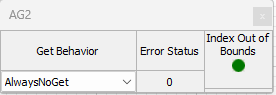
Subcanvas Array Get inspector
Arguments
subCanvasName
Points to the Subcanvas module that the target module is in. This can be the path relative to the Subcanvas Array Get module, where '\' is used to go up a level in hierarchy, or it can be the alias name if the Subcanvas module has an objectAlias defined.
modVar
The array variable to read is specified in mod.var format. The array variable is specified as modName.variableName, where modName is the name of the target module as listed in the AWC file associated with the Subcanvas pointed to by subCanvasName. This name will either be the full hierarchical name of the target module, or the alias if it has an objectAlias assigned.
If the variable being read is not an array, then you will get an error when you build the system. If you need to read a scalar variable then use Subcanvas Param Get module.
numValues
The numValues argument specifies the number of array values to read. If numValues is empty, then the number of values is taken from the modVar variable total number of values. This used alongside the numChannels and blockSize to define the dimensions of the output wire. numValues can be <= total size of the target array.
If both numChannels and blockSize are defined, then they override the numValues argument. numValues must be an integer multiple of the channels on the output wire.
numChannels
The numChannels argument specifies the number channels for the output wire. If numChannels is empty, then the number of channels is taken from the modVar variable number of cols.
blockSize
The blockSize argument specifies the block size for the output wire. If blockSize is empty, then the block size is taken from the modVar variable number of rows. If numValues < totalSize of the target array, then blockSize will be reduced so that blockSize * numChannels = numValues.
sampleRate
The sampleRate argument specifies the sample rate for the output wire. If sampleRate is empty, then the output wire sample rate is inherited from the containing subsystem.
executionOrder
The executionOrder argument enforces the order of processing of the Subcanvas Array Get module relative to the target Subcanvas module. After means that the Subcanvas Array Get module will execute after the target Subcanvas module, and Before means that it will execute before the target Subcanvas module. The default is Undefined, which means that no execution order is enforced.
Note that this argument only functions for the Classic build engine type (see here for more information, including how to accomplish this for Hierarchical builds: https://documentation.dspconcepts.com/awe-designer/latest-version/preferences-and-layout#id-(8.2025.3)PreferencesandLayout-BuildEngine ).
Variables
getBehavior
The read behavior of the module is specified on the inspector in the 'Get Behavior' droplist. The array variable is read on every pump.
The options for getBehavior are as follows:
AlwaysNoGet (0) – Always reads the values and never calls the target module's Get function.
AlwaysDeferredGet (1) – Always reads the values and calls the target module’s Get() function from the deferred thread. The Get function will then update variables for a future array read.
AlwaysInstantGet (2) - The module's Get function is always called from the real-time thread and then the values are read. This can lead to an increase in the CPU load.
Module Get functions are used to update module variables that need adjustments to be properly observable. Few modules have Get() functions, thus the default option is ”AlwaysNoGet”.
startIndex
The startIndex variable specifies the position to start reading in the array, and it lets the user read only portions of the target array. This is a zero-based offset, can be positive or negative, and is 0 by default. If it is negative, samples are skipped by increments of ‘step’ until it is positive (call this N), at which point we start reading from the target array. The first N samples of the output wire will be set to 0.
See the Block Overlap Reads section below for details on this behavior.
step
The 'step' variable is added to the target array index after every read occurs. This is often referred to as the step, increment, or the stride. For example, if step=1, then values are read sequentially from the array. If you set step=2, then every second value in the array is read. Note that step only applies to the read index; the write index used when writing the output wire buffer is always 1.
See the Block Overlap Reads section below for details on this behavior.
Block Overlap Reads
The behavior of startIndex and step variables can be confusing, especially since startIndex can be negative and startIndex + numValues * step can be greater than the size of the target array (or even a negative number!). This flexibility of the startIndex and step, plus the fact that they can change during runtime, makes it possible to do things like read only one channel of data from an array, or extract only portions of it at a time. The diagrams below are meant to help understand the block overlap design used to decide which target elements get written into which output wire elements.
Perfect Overlap
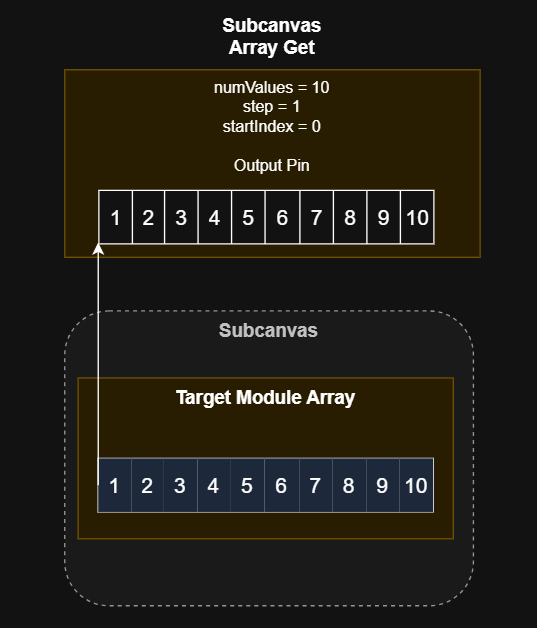
This is the easiest case, and the most common. The target array is the same size as the module output, step == 1, and startIndex == 0. The target array is simply copied to the module output.
Perfect Overlap with Step
In this example, the output pin size is 5, the target array size is 10, and step is 2. startIndex is 0. With a step of 2, every other element of the target array is written to the first 5 elements of the Subcanvas Array Get output pin.
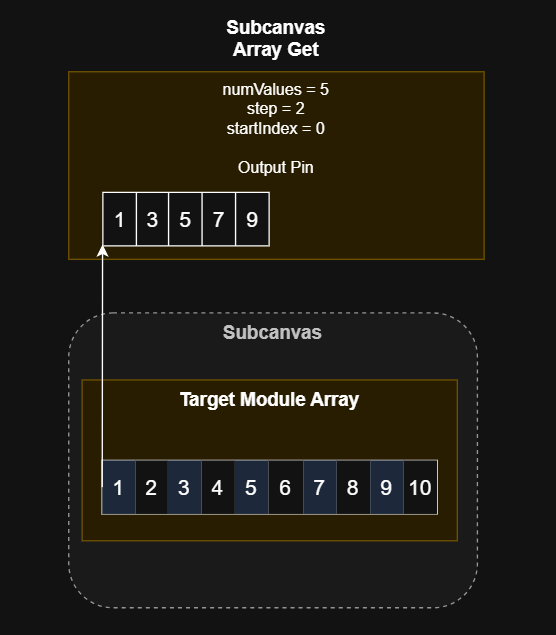
This is one way to extract the first channel only from an array with stereo data.
Partial Overlap, Positive Start Index
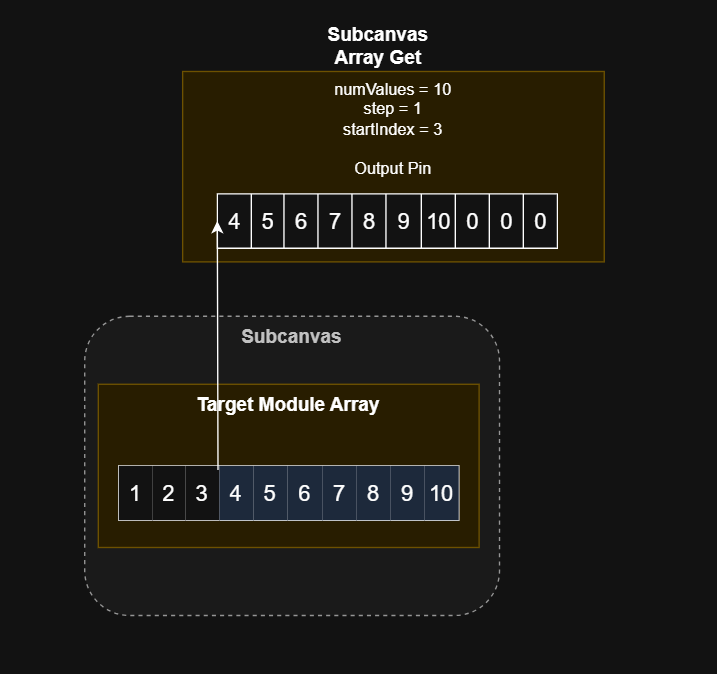
In this case, startIndex is > 0 and step is 1. This means that the overlap between the target array and the module output is smaller than numValues. The first numValues - startIndex values of the output will be equal to the startIndex:arraySize-1 elements of the target array. The remaining 3 elements of the output that do not overlap with the target array are zeros.
Partial Overlap, Negative Start Index, Non-Unity Step
In this case, startIndex is -5 and step is 2. This again means that the overlap between the target array and the module output is smaller than numValues. However, since the overlap covers the left side of the target array, the first startIndex / step values of the output will be zero. The remaining values will be copied from the beginning of the target array, at intervals of 2 until the end of the target array is reached.
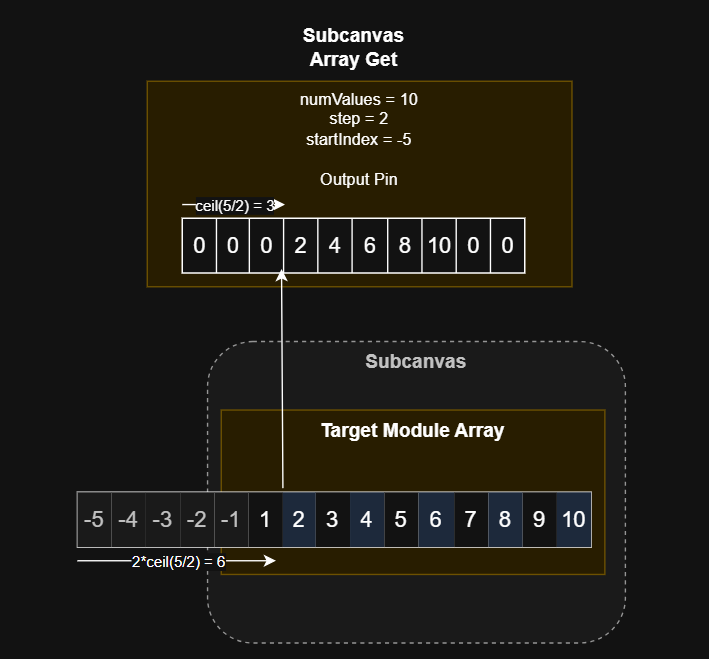
As seen above, the first value that can be read from the target array is calculated as step * ceil(-startIndex/step). In this case, that means that we move forward 6 spaces in the target array, starting at -5. So the first element read is the second element in the array (array[1] in C syntax), which is equal to 2. Since step does not apply to the output pin, we skip ceil(5/2)=3 elements in the output pin and write the first value in the 4th element. We continue copying every other value (step = 2) from the target array to sequential values in the output pin until we reach the end of the target array. In this case, the final two values of the output pin are filled with zeros.
Deinterleaved / Interleaved Behavior
Wires in Audio Weaver are always assumed to contain interleaved data. However, some module arrays will store data in deinterleaved format, which can lead to unexpected behavior if it is not known when using this module. The most notable such modules for the Subcanavs Array Get are the Sink modules. While the standard versions of the Sink modules (Sink, Sink Int, Sink Fract32) always store the .value array in the deinterleaved format, there is also an Interleaved Sink module for floating point data that stores the .value array as interleaved data instead. The formatting of the target array can impact how the step/startIndex values are configured with this module, and also how the output pin will be formatted.
Module Pack
Advanced
ClassID
classID = 1452
Type Definition
typedef struct _ModuleSubcanvasArrayGet
{
    ModuleInstanceDescriptor instance;            // Common Audio Weaver module instance structure
    INT32 getBehavior;                            // Controls the get behavior of the module
    INT32 startIndex;                             // Location to start reading from in the target array
    INT32 step;                                   // Increment between reading of values from target array
    INT32 outOfBoundsIndex;                       // Boolean that indicates when the module is asked to read outside of the array bounds
    INT32 errorStatus;                            // Shows the current status of the module. 0 means no error. See module docs for details
    UINT32 objectHandle;                          // Integer control handle of the internal module to control
    UINT32 targetClassId;                         // Class id of the target module, used for validating access of object
    INT32 arrayLength;                            // Total length of the array variable
    UINT32 mask;                                  // Mask used when calling the get function
    void * subCanvasPtr;                          // Points to the Subcanvas module to control
} ModuleSubcanvasArrayGetClass;
Variables
Properties
Name | Type | Usage | isHidden | Default Value | Range | Units |
|---|---|---|---|---|---|---|
getBehavior | int | parameter | 0 | 1 | Unrestricted | |
startIndex | int | parameter | 0 | 0 | Unrestricted | |
step | int | parameter | 0 | 1 | Unrestricted | |
outOfBoundsIndex | int | state | 0 | 0 | Unrestricted | |
errorStatus | int | state | 0 | 0 | Unrestricted | |
objectHandle | uint | parameter | 1 | 0 | Unrestricted | |
targetClassId | uint | parameter | 1 | 0 | Unrestricted | |
arrayLength | int | parameter | 1 | 0 | Unrestricted | |
mask | uint | derived | 1 | 0 | Unrestricted | |
subCanvasPtr | void * | parameter | 1 |
| Unrestricted |
Pins
Output Pins
Name | value |
Description | parameter value |
Data Type | {float, int, fract32} |
Matlab Usage
function M = subcanvas_array_get_module(NAME, SUBCANVAS_NAME, MODVAR, NUM_VALUES, NUM_CHANNELS, BLOCK_SIZE, SAMPLE_RATE, EXECUTION_ORDER)
% M = subcanvas_array_get_module(NAME, SUBCANVAS_NAME, MODVAR, NUM_VALUES, NUM_CHANNELS, BLOCK_SIZE, SAMPLE_RATE, EXECUTION_ORDER
% Module which reads array values from the Subcanvas module. Arguments:
%   NAME - name of the module.
%   SUBCANVAS_NAME - name of the Subcanvas module that it is paired with.
%   MODVAR -   specifies the module and variable name using the form:
%              'MOD.VAR' where MOD is the module name and VAR is the
%              variable name.  You can also specify internal subsystems using
%              'SUBSYS.MOD.VAR'.  The variable being read from must be an array.
%   NUM_VALUES - Number of values to read from the array.  If you leave this empty,
%              then the module will read out all values of the array.
%   NUM_CHANNELS - Number of channels configured for the output pin.
%   BLOCK_SIZE - Block size configured for the output pin.
%   SAMPLE_RATE - sample rate of the output pin, in Hz.  If this is empty, then
%               the sample rate is the block rate of the first input pin at this
%               level of hierarchy.
%   EXECUTION_ORDER - Determines when the ArrayGet module executes relative
%              to the module it is controlling.  Allowable values are:
%                  'undefined' - the default.  The execution order is set
%                                by the routing algorithm and can occur before
%                                or after the module it is controlling.
%                  'before' - forces ArrayGet to execute before the module it
%                            is controlling.
%                  'after' - forces ArrayGet to execute after the module it
%                            is controlling.
%               When using 'before' and 'after' you could get a build error
%               indicating that no more modules can execute or there is a
%               circular dependency.
%
% The information for the data type and array size is taken from the AWC file
% for the Subcanvas module.
%
% The module output pin will default to 1 channel with a blockSize of NUM_VALUES
% if the NUM_CHANNELS and BLOCK_SIZE arguments are left empty.
%
% If NUM_VALUES, NUM_CHANNELS, and BLOCK_SIZE are left empty then the
% output pin number of channels shall be the modVar variable rows and the output
% pin block size shall be the modVar variable cols
% if those arguments are left empty.