
Subcanvas Param Set
Overview
This module sets a single value inside of the Subcanvas. The value can be a scalar or a single value of an array.
Discussion
This module is the Subcanvas version of the Param Set module that is able to write into module variables inside of a Subcanvas. The name of the Subcanvas module and the name of the internal variable to set are specified as module arguments. The variable to write is specified in mod.var format. The module writes the variable in the real-time thread and you can optionally call the module's set function.
The module also has an optional enable pin which can be used to enable or disable the setting of the variable.
The modules uses information from the Subcanvas's AWC file to identify which variables are available to control. The AWC file contains variable names, data types, range information, and array sizes.
If the AWC file has range information for the selected variable, then the inspector will provide a checkbox to enable or disable range checking. This checkbox is only there if the module has range information. It can also be configured to clip to the allowable range.
There is also an errorStatus variable that will be set to a negative value if an error has been encountered. errorStatus is included in the module inspector. Common errorStatus values are:
0 (E_SUCCESS): No error encountered.
-26 (E_NO_LAYOUTS): The Subcanvas module does not have a valid layout running (e.g. loadNow variable is set to ‘Empty’).
-83 (E_CLASS_NOT_SUPPORTED): The objectHandle points to a module of an unexpected classId.
For other values of errorStatus, see Bin\Assets\module\include\Errors.h for details.
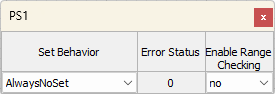
Subcanvas Param Set inspector, with range checking available on target variable
Arguments
subCanvasName
Points to the Subcanvas module that the target module is in. This can be the path relative to the Subcanvas Param Set module, where '\' is used to go up a level in hierarchy, or it can be the alias name if the Subcanvas module has an objectAlias defined.
modVar
The variable to write to is specified in mod.var format. The variable is specified as modName.variableName, where modName is the name of the target module as listed in the AWC file associated with the Subcanvas pointed to by subCanvasName. This name will either be the full hierarchical name of the target module, or the alias if it has an objectAlias assigned.
To write to a scalar, use modName.variableName directly. To write to an array value, use modName.variableName[offset]. This module only allows you to write one value in an array, and offset (zero-indexed) must be < size of the array. If you need to write multiple array values, use the Subcanvas Array Set module.
enablePin
If set to True, this argument creates an enable pin which can be used to enable or disable the writing of the variable. This pin accepts integer inputs only of blockSize = channels = 1. Any non-zero value is treated as enabled.
executionOrder
The executionOrder argument enforces the order of processing of the Subcanvas Param Set module relative to the target Subcanvas module. After means that the Subcanvas Param Set module will execute after the target Subcanvas module, and Before means that it will execute before the target Subcanvas module. The default is Undefined, which means that no execution order is enforced.
Note that this argument only functions for the Classic build engine type (see here for more information, including how to accomplish this for Hierarchical builds: Preferences and Layout | Build-Engine ).
Variables
setBehavior
This parameter controls when the variable is written and if and when the internal module’s Set function is called.
AlwaysNoSet (0)– The variable is written every time the Subcanvas Param Set module executes. The Set function of the module being controlled is never called.
AlwaysDeferredSet (1) - The variable is written every time the Subcanvas Param Set module executes. The Set function of the module being controlled is called from the deferred processing thread of the top-level system.
OnChangeNoSet (2) – The variable is written whenever the value on the input pin changes. The Set function of the module being controlled is never called.
OnChangeDeferredSet (3) - The variable is written whenever the value on the input pin changes. The Set function of the module being controlled is called from the deferred processing thread of the top-level system.
OnChangeInstantSet (4) - The variable is written whenever the value on the input pin changes. Every time the variable changes, the module’s Set function will be called from the real-time processing function of the Subcanvas Param Set module.
The options are provided to allow you to tailor the control processing based on the needs of your system. Here are some basic guidelines.
The module’s Set function converts high-level parameters to derived variables which may be used in the module’s Processing function. Unless you are very familiar with the module, you should call the Set() function.
You rarely need to “Always” set the variable. It is best to do it on change since this avoids recalculating the same values in the Set function.
“DeferredSet” is better than “InstantSet” because it avoids spikes in the CPU load. The module Set() functions were not optimized for speed and may do sophisticated calculations. If the module is configured for “InstantSet”, then the calculations will be performed in the real-time thread which can lead to CPU overruns.
enableRangeCheck
This checkbox will appear on the module only if the AWC file defines range information for this variable. The range will be available in the AWC file if the target module variable had ranges applied ('Min' and 'Max') in the Variables tab of the module properties. When checked, the variable value will be clipped to the minValue and maxValue listed in the AWC file. If range information is available, you will also see the range information displayed on the canvas underneath the SubcanvasParamSet module:
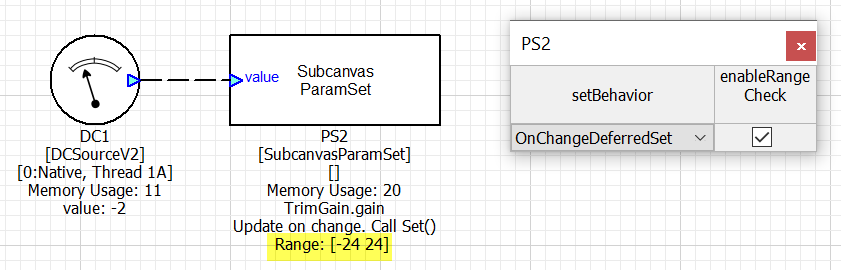
Subcanvas Param Set with range information available for the target module
When range information is not available, you will see:
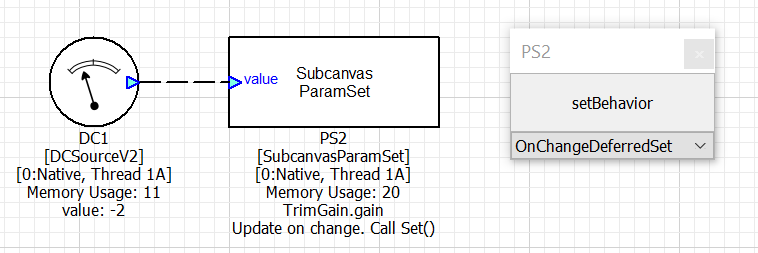
Subcanvas Param Set without range information available for the target module
Miscellaneous Info
Here is some more information to help you take full advantage of the SubcanvasParamSet module.
The module does nothing if the Subcanvas is not initialized (empty). This makes it safe to keep the module active even if the Subcanvas has not yet loaded.
The SubcanvasParamSet module will always write the variable on the first pump cycle. This occurs even when configured for “OnChange”.
The data type of the module’s input pin is taken from the AWC file. Audio Weaver will enforce that you are writing using the correct data type.
The module only accepts a control signal (1 channel with a block size of 1) on the value pin. The sample rate of the input pin is ignored.
The enablePin argument causes another pin to appear on the module. This pin accepts an integer control signal and can be used to enable or disable the operation of the module.
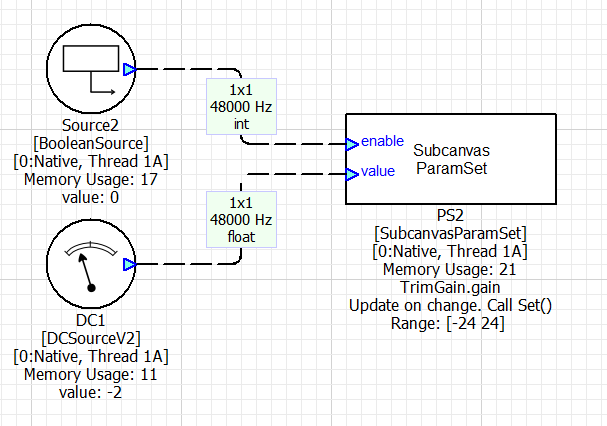
Subcanvas Param Set with the enable input pin
If you want to create a subsystem inspector to work with the SubcanvasParamSet module, then add DC sources to the input pins. These DC sources can then be bound to the system inspector controls.
If writing to a frac32 source module inside the Subcanvas, you cannot use DC Source V2 Fract32 directly due to some nuances in its implementation. Instead, convert to a float and use DC Source V2, or use Buffer Source V2 Fract32 with a block size of 1 and write the fract32 value directly.
Module Pack
Advanced
ClassID
classID = 1449
Type Definition
typedef struct _ModuleSubcanvasParamSet
{
    ModuleInstanceDescriptor instance;            // Common Audio Weaver module instance structure
    INT32 setBehavior;                            // Controls the set behavior of the module
    INT32 enableRangeCheck;                       // Turns on range checking of values
    INT32 errorStatus;                            // Shows the current status of the module. 0 means no error. See module docs for details
    UINT32 objectHandle;                          // Integer control handle of the internal module to control
    UINT32 targetClassId;                         // Class id of the target module, used for validating access of object
    UINT32 arrayOffset;                           // When setting array values, this is the offset to write into from the start of the array
    UINT32 mask;                                  // Mask value used when calling the set function
    INT32 lastValue;                              // Holds previous value used
    INT32 minValue;                               // Minimum value for range checking. Will be scrambled for float values.
    INT32 maxValue;                               // Maximum value for range checking. Will be scrambled for float values.
    INT32 dataType;                               // Specifies data type: float=0, fract32=1, int=2
    void * subCanvasPtr;                          // Points to the Subcanvas module to control
} ModuleSubcanvasParamSetClass;
Variables
Properties
Name | Type | Usage | isHidden | Default Value | Range | Units |
|---|---|---|---|---|---|---|
setBehavior | int | parameter | 0 | 3 | Unrestricted | |
enableRangeCheck | int | parameter | 0 | 0 | 0:1 | |
errorStatus | int | state | 0 | 0 | Unrestricted | |
objectHandle | uint | parameter | 1 | 0 | Unrestricted | |
targetClassId | uint | parameter | 1 | 0 | Unrestricted | |
arrayOffset | uint | parameter | 1 | 0 | Unrestricted | |
mask | uint | derived | 1 | 0 | Unrestricted | |
lastValue | int | parameter | 1 | -123456 | Unrestricted | |
minValue | int | parameter | 1 | -100 | Unrestricted | |
maxValue | int | parameter | 1 | 100 | Unrestricted | |
dataType | int | parameter | 1 | 0 | Unrestricted | |
subCanvasPtr | void * | parameter | 1 |
| Unrestricted |
Pins
Input Pins
Enable Pin (optional) | |
|---|---|
Name | enable |
Description | parameter value |
Data type | int |
Channel range | 1 |
Block size range | 1 |
Sample rate range | Unrestricted |
Complex support | Real |
Value Pin | |
|---|---|
Name | value |
Description | parameter value |
Data type | {float, int, fract32} |
Channel range | 1 |
Block size range | 1 |
Sample rate range | Unrestricted |
Complex support | Real |
Matlab Usage
function M = subcanvas_param_set_module(NAME, SUBCANVAS_NAME, MODVAR, ENABLE_PIN, EXECUTION_ORDER)
% M = subcanvas_param_set_module(NAME, SUBCANVAS_NAME, MODVAR, ENABLE_PIN, EXECUTION_ORDER)
% ParamSet module which works with the Subcanvas module.  This module sets
% internal variables within the Subcanvas.  It works with scalar and array
% variables and sets a single value.  Arguments:
%   NAME - name of the module.
%   SUBCANVAS_NAME - name of the Subcanvas module that it is paired with.
%   MODVAR -   specifies the module and variable name using the form:
%              'MOD.VAR' where MOD is the module name and VAR is the
%              variable name.  You can also specify internal subsystems using
%              'SUBSYS.MOD.VAR'.  You can specify individual array values
%              as 'MOD.VAR[n]'.
%   ENABLE_PIN - Boolean which adds an optional enable pin to the module.
%               By default, ENABLE_PIN = 0.
%   EXECUTION_ORDER - Determines when the ParamSet module executes relative
%              to the module it is controlling.  Allowable values are:
%                  'undefined' - the default.  The execution order is set
%                                by the routing algorithm and can occur before
%                                or after the module it is controlling.
%                  'before' - forces ParamSet to execute before the module it
%                            is controlling.
%                  'after' - forces ParamSet to execute after the module it
%                            is controlling.
%               When using 'before' and 'after' you could get a build error
%               indicating that no more modules can execute or there is a
%               circular dependency.
%
% The information for the data type and array size is taken from the JSON file
% for the Subcanvas module.